This page was generated from
docs/Installation/MAGEMin_PythonCall.ipynb.
Interactive online version:
 .
.
Please download this notebook (use the links above to find the source file) and run the following installation script as a notebook.
Running MAGEMin calculations through Julia
PetThermoTools provides the ability to run calculations/models that utilize the recent Weller et al. (2024) and Green et al. (2025) thermodynamic models. Once everything is set up you should be able to run these calculations from the same functions used to run models with alphaMELTS, but simply setting the Model kwarg to Green2025 or Weller2024.
I’ve worked hard to try and ensure a set up routine that works on every operating system, regardless of prior installations etc. There is, however, a good chance you’ll come across a bug/issue I haven’t seen before. If there is an issue in the following script/functions please email me (gleesonm@berkeley.edu) and I will try to find a fix as quickly as possible!
The following notebook and functions will establish a new julia environment on your machine. From PetThermoTools v0.2.51 and later this environment will be activated whenever a MAGEMin calculation is initialized from Python. This should ensure that any prior julia installations/packages on your machine are not influenced by the following installation routine.
Step 1 - install juliacall
Uncomment the line below and install juliacall in your Python environment. You must have first installed petthermotools!
[2]:
# %pip install juliacall
Step 2 - Install MAGEMin
Import PetThermoTools (install it if you haven’t done so yet) and then use the inbuilt functions to install MAGEMin_C and MAGEMinCalc using the function below. You will need top uncomment the function to run it. If you’ve previously run this section successfully import PetThermoTools and then go to Step 2b to update the MAGEMinCalc and MAGEMin_C installations.
[ ]:
# %pip install petthermotools #### If running on Victor uncomment this line to install petthermotools
[1]:
import petthermotools as ptt
ptt.__version__  # should ve v0.3.2 or later
alphaMELTS for Python files successfully located.
If using the Green et al. (2025) or Weller et al. (2024) thermodynamic models please run `ptt.activate_petthermotools_env()` prior to any calculations.
nGibbs not installed — nGibbs emulators are unavailable. Install it if you'd like with `ptt.install_nGibbs()` (~300 MB storage required).
[1]:
'1.1.4'
This code installs MAGEMinCalc and underlying dependencies in julia and links them to the PetThermoTools installation. In a couple of cases the code below has caused the Python kernel to crash AFTER it completed. Therefore if a kernel crash message appears don’t worry, just restart the kernel and procede to the test_MAGEMinCalc() function below (step 3).
NOTE ######### This may take 20-25 minutes on some computers, go grab a drink!
[2]:
ptt.install_MAGEMinCalc()
If you encounter issues with the installation process please contact me at gleesonm@berkeley.edu
[juliapkg] Found dependencies: /Users/gleesonm/anaconda3/envs/py_test_13_/lib/python3.13/site-packages/juliapkg/juliapkg.json
[juliapkg] Found dependencies: /Users/gleesonm/anaconda3/envs/py_test_13_/julia_env/pyjuliapkg/juliapkg.json
[juliapkg] Found dependencies: /Users/gleesonm/anaconda3/envs/py_test_13_/lib/python3.13/site-packages/juliacall/juliapkg.json
[juliapkg] Locating Julia ~1.11
[juliapkg] Installing Julia 1.11.9 using JuliaUp
[juliapkg] WARNING: You have Julia 1.12.2 installed but ~1.11 is required.
[juliapkg]   It is recommended that you upgrade Julia or install JuliaUp.
[juliapkg] Querying Julia versions from https://julialang-s3.julialang.org/bin/versions.json
[juliapkg] WARNING: About to install Julia 1.11.9 to /Users/gleesonm/anaconda3/envs/py_test_13_/julia_env/pyjuliapkg/install.
[juliapkg]   If you use juliapkg in more than one environment, you are likely to
[juliapkg]   have Julia installed in multiple locations. It is recommended to
[juliapkg]   install JuliaUp (https://github.com/JuliaLang/juliaup) or Julia
[juliapkg]   (https://julialang.org/downloads) yourself.
[juliapkg] Downloading Julia from https://julialang-s3.julialang.org/bin/mac/aarch64/1.11/julia-1.11.9-macaarch64.dmg
             downloaded 2.2 MB of 225.3 MB
             downloaded 5.8 MB of 225.3 MB
             downloaded 8.4 MB of 225.3 MB
             downloaded 9.9 MB of 225.3 MB
             downloaded 13.8 MB of 225.3 MB
             downloaded 15.8 MB of 225.3 MB
             downloaded 16.3 MB of 225.3 MB
             downloaded 38.4 MB of 225.3 MB
             downloaded 75.2 MB of 225.3 MB
             downloaded 123.5 MB of 225.3 MB
             downloaded 173.1 MB of 225.3 MB
             download complete
[juliapkg] Verifying download
[juliapkg] Installing Julia 1.11.9 to /Users/gleesonm/anaconda3/envs/py_test_13_/julia_env/pyjuliapkg/install
[juliapkg] Using Julia 1.11.9 at /Users/gleesonm/anaconda3/envs/py_test_13_/julia_env/pyjuliapkg/install/bin/julia
[juliapkg] Finding libjulia:
           | using Libdl
           | print(abspath(Libdl.dlpath("libjulia")))
[juliapkg] Using Julia project at /Users/gleesonm/anaconda3/envs/py_test_13_/julia_env
[juliapkg] Writing Project.toml:
           | [deps]
           | PythonCall = "6099a3de-0909-46bc-b1f4-468b9a2dfc0d"
           | OpenSSL_jll = "458c3c95-2e84-50aa-8efc-19380b2a3a95"
           |
           | [compat]
           | PythonCall = "=0.9.35"
           | OpenSSL_jll = "3.0.0 - 3.6"
[juliapkg] Installing packages:
           | import Pkg
           | Pkg.Registry.update()
           | Pkg.add([
           |   Pkg.PackageSpec(name="PythonCall", uuid="6099a3de-0909-46bc-b1f4-468b9a2dfc0d"),
           |   Pkg.PackageSpec(name="OpenSSL_jll", uuid="458c3c95-2e84-50aa-8efc-19380b2a3a95"),
           | ])
           | Pkg.resolve()
           | Pkg.precompile()
    Updating registry at `~/.julia/registries/General.toml`
   Resolving package versions...
   Installed OpenSSL_jll ─ v3.5.7+0
    Updating `~/anaconda3/envs/py_test_13_/julia_env/Project.toml`
  [6099a3de] + PythonCall v0.9.35
  [458c3c95] + OpenSSL_jll v3.5.7+0
    Updating `~/anaconda3/envs/py_test_13_/julia_env/Manifest.toml`
  [992eb4ea] + CondaPkg v0.2.36
  [9a962f9c] + DataAPI v1.16.0
  [e2d170a0] + DataValueInterfaces v1.0.0
  [82899510] + IteratorInterfaceExtensions v1.0.0
  [692b3bcd] + JLLWrappers v1.8.0
  [682c06a0] + JSON v1.6.1
  [1914dd2f] + MacroTools v0.5.16
  [0b3b1443] + MicroMamba v0.1.15
  [bac558e1] + OrderedCollections v2.0.1
  [69de0a69] + Parsers v2.8.6
  [fa939f87] + Pidfile v1.3.0
⌅ [aea7be01] + PrecompileTools v1.2.1
  [21216c6a] + Preferences v1.5.2
  [6099a3de] + PythonCall v0.9.35
  [6c6a2e73] + Scratch v1.3.0
  [ec057cc2] + StructUtils v2.8.2
  [3783bdb8] + TableTraits v1.0.1
  [bd369af6] + Tables v1.13.0
  [e17b2a0c] + UnsafePointers v1.0.0
  [458c3c95] + OpenSSL_jll v3.5.7+0
  [f8abcde7] + micromamba_jll v2.3.1+0
  [4d7b5844] + pixi_jll v0.63.2+0
  [0dad84c5] + ArgTools v1.1.2
  [56f22d72] + Artifacts v1.11.0
  [2a0f44e3] + Base64 v1.11.0
  [ade2ca70] + Dates v1.11.0
  [f43a241f] + Downloads v1.6.0
  [7b1f6079] + FileWatching v1.11.0
  [b77e0a4c] + InteractiveUtils v1.11.0
  [4af54fe1] + LazyArtifacts v1.11.0
  [b27032c2] + LibCURL v0.6.4
  [76f85450] + LibGit2 v1.11.0
  [8f399da3] + Libdl v1.11.0
  [56ddb016] + Logging v1.11.0
  [d6f4376e] + Markdown v1.11.0
  [ca575930] + NetworkOptions v1.2.0
  [44cfe95a] + Pkg v1.11.0
  [de0858da] + Printf v1.11.0
  [9a3f8284] + Random v1.11.0
  [ea8e919c] + SHA v0.7.0
  [9e88b42a] + Serialization v1.11.0
  [fa267f1f] + TOML v1.0.3
  [a4e569a6] + Tar v1.10.0
  [8dfed614] + Test v1.11.0
  [cf7118a7] + UUIDs v1.11.0
  [4ec0a83e] + Unicode v1.11.0
  [deac9b47] + LibCURL_jll v8.6.0+0
  [e37daf67] + LibGit2_jll v1.7.2+0
  [29816b5a] + LibSSH2_jll v1.11.0+1
  [c8ffd9c3] + MbedTLS_jll v2.28.6+0
  [14a3606d] + MozillaCACerts_jll v2023.12.12
  [83775a58] + Zlib_jll v1.2.13+1
  [8e850ede] + nghttp2_jll v1.59.0+0
  [3f19e933] + p7zip_jll v17.4.0+2
        Info Packages marked with ⌅ have new versions available but compatibility constraints restrict them from upgrading. To see why use `status --outdated -m`
Precompiling project...
    905.6 ms  ✓ DataAPI
    910.3 ms  ✓ IteratorInterfaceExtensions
    960.9 ms  ✓ OrderedCollections
    941.9 ms  ✓ DataValueInterfaces
    970.6 ms  ✓ UnsafePointers
    493.2 ms  ✓ Pidfile
    602.4 ms  ✓ Scratch
    778.4 ms  ✓ StructUtils
    724.0 ms  ✓ Preferences
    530.5 ms  ✓ TableTraits
    611.4 ms  ✓ PrecompileTools
    643.3 ms  ✓ JLLWrappers
   1903.2 ms  ✓ MacroTools
    828.1 ms  ✓ OpenSSL_jll
   1315.1 ms  ✓ micromamba_jll
   1776.9 ms  ✓ Tables
   1073.6 ms  ✓ pixi_jll
    923.3 ms  ✓ StructUtils → StructUtilsTablesExt
   1325.4 ms  ✓ MicroMamba
   4650.1 ms  ✓ Parsers
   2351.8 ms  ✓ JSON
   3273.0 ms  ✓ CondaPkg
   9592.7 ms  ✓ PythonCall
  23 dependencies successfully precompiled in 22 seconds. 27 already precompiled.
  No Changes to `~/anaconda3/envs/py_test_13_/julia_env/Project.toml`
  No Changes to `~/anaconda3/envs/py_test_13_/julia_env/Manifest.toml`
Detected IPython. Loading juliacall extension. See https://juliapy.github.io/PythonCall.jl/stable/compat/#IPython
  Activating project at `~/.petthermotools_julia_env`
Precompiling project...
    457.5 ms  ✓ LaTeXStrings
    451.7 ms  ✓ Reexport
    464.2 ms  ✓ InvertedIndices
    515.1 ms  ✓ InverseFunctions
    776.1 ms  ✓ OrderedCollections
    577.0 ms  ✓ Statistics
    597.8 ms  ✓ DocStringExtensions
    348.6 ms  ✓ CommonSolve
    677.1 ms  ✓ InlineStrings
    447.5 ms  ✓ ConstructionBase
    435.5 ms  ✓ WorkerUtilities
   1115.2 ms  ✓ IrrationalConstants
    424.4 ms  ✓ CompositionsBase
    438.1 ms  ✓ CEnum
   1077.7 ms  ✓ ProgressMeter
   1218.9 ms  ✓ Crayons
    584.3 ms  ✓ StaticArraysCore
    541.7 ms  ✓ Missings
    611.3 ms  ✓ TranscodingStreams
    389.0 ms  ✓ Memoize
    711.3 ms  ✓ PooledArrays
    630.6 ms  ✓ Compat
    551.4 ms  ✓ NLopt_jll
    624.5 ms  ✓ OpenSpecFun_jll
   1279.4 ms  ✓ SentinelArrays
    576.2 ms  ✓ OpenBLAS32_jll
    743.0 ms  ✓ InverseFunctions → InverseFunctionsDatesExt
    759.5 ms  ✓ InverseFunctions → InverseFunctionsTestExt
   1832.4 ms  ✓ StringManipulation
    604.1 ms  ✓ InlineStrings → ParsersExt
    588.0 ms  ✓ ConstructionBase → ConstructionBaseLinearAlgebraExt
   1584.9 ms  ✓ DataStructures
    748.1 ms  ✓ CompositionsBase → CompositionsBaseInverseFunctionsExt
   1258.4 ms  ✓ LogExpFunctions
    978.1 ms  ✓ StructUtils → StructUtilsStaticArraysCoreExt
    867.4 ms  ✓ Compat → CompatLinearAlgebraExt
   1369.5 ms  ✓ BasicInterpolators
   1557.1 ms  ✓ CodecZlib
   1084.4 ms  ✓ MAGEMin_jll
   1040.1 ms  ✓ Setfield
    868.8 ms  ✓ SortingAlgorithms
   1235.0 ms  ✓ WeakRefStrings
    539.9 ms  ✓ LogExpFunctions → LogExpFunctionsInverseFunctionsExt
    574.6 ms  ✓ FilePathsBase
   2958.9 ms  ✓ Accessors
   7509.7 ms  ✓ Statistics → SparseArraysExt
   3627.0 ms  ✓ SpecialFunctions
    487.4 ms  ✓ FilePathsBase → FilePathsBaseMmapExt
   1146.5 ms  ✓ FilePathsBase → FilePathsBaseTestExt
    859.7 ms  ✓ Accessors → LinearAlgebraExt
    823.8 ms  ✓ Accessors → TestExt
   3101.8 ms  ✓ Roots
  17630.7 ms  ✓ PrettyTables
  12800.2 ms  ✓ CSV
  16430.0 ms  ✓ Polynomials
  23154.3 ms  ✓ DataFrames
   4137.0 ms  ✓ MAGEMin_C
  12165.7 ms  ✓ MAGEMinCalc
  58 dependencies successfully precompiled in 64 seconds. 56 already precompiled.
  1 dependency precompiled but a different version is currently loaded. Restart julia to access the new version. Otherwise, loading dependents of this package may trigger further precompilation to work with the unexpected version.
  1 dependency had output during precompilation:
┌ MAGEMinCalc
│  Using libMAGEMin.dylib from MAGEMin_jll
└
    Updating `~/.petthermotools_julia_env/Project.toml`
  [6099a3de] - PythonCall v0.9.35
  No Changes to `~/.petthermotools_julia_env/Manifest.toml`
    Updating `~/.petthermotools_julia_env/Project.toml`
  [e5d170eb] - MAGEMin_C v2.2.6
  No Changes to `~/.petthermotools_julia_env/Manifest.toml`
    Updating `~/.petthermotools_julia_env/Project.toml`
  [dd69d18c] - MAGEMinCalc v0.6.2 `~/Library/CloudStorage/GoogleDrive-gleesonm@berkeley.edu/My Drive/2022/GitHub/MAGEMinCalc`
    Updating `~/.petthermotools_julia_env/Manifest.toml`
  [7d9f7c33] - Accessors v0.1.45
  [26cce99e] - BasicInterpolators v0.7.1
  [fa961155] - CEnum v0.4.2
  [336ed68f] - CSV v0.10.16
  [944b1d66] - CodecZlib v0.7.8
  [38540f10] - CommonSolve v0.2.9
  [34da2185] - Compat v4.18.1
  [a33af91c] - CompositionsBase v0.1.2
  [992eb4ea] - CondaPkg v0.2.36
  [187b0558] - ConstructionBase v1.6.0
  [a8cc5b0e] - Crayons v4.1.1
  [9a962f9c] - DataAPI v1.16.0
  [a93c6f00] - DataFrames v1.7.1
  [864edb3b] - DataStructures v0.19.5
  [e2d170a0] - DataValueInterfaces v1.0.0
  [ffbed154] - DocStringExtensions v0.9.5
  [48062228] - FilePathsBase v0.9.24
  [842dd82b] - InlineStrings v1.4.5
  [3587e190] - InverseFunctions v0.1.17
  [41ab1584] - InvertedIndices v1.3.1
  [92d709cd] - IrrationalConstants v0.2.6
  [82899510] - IteratorInterfaceExtensions v1.0.0
  [692b3bcd] - JLLWrappers v1.8.0
  [682c06a0] - JSON v1.6.1
  [b964fa9f] - LaTeXStrings v1.4.0
  [2ab3a3ac] - LogExpFunctions v1.0.1
  [dd69d18c] - MAGEMinCalc v0.6.2 `~/Library/CloudStorage/GoogleDrive-gleesonm@berkeley.edu/My Drive/2022/GitHub/MAGEMinCalc`
  [e5d170eb] - MAGEMin_C v2.2.6
  [1914dd2f] - MacroTools v0.5.16
  [c03570c3] - Memoize v0.4.4
  [0b3b1443] - MicroMamba v0.1.15
  [e1d29d7a] - Missings v1.2.0
  [bac558e1] - OrderedCollections v1.8.2
  [69de0a69] - Parsers v2.8.6
  [fa939f87] - Pidfile v1.3.0
  [f27b6e38] - Polynomials v4.1.1
  [2dfb63ee] - PooledArrays v1.4.3
  [aea7be01] - PrecompileTools v1.2.1
  [21216c6a] - Preferences v1.5.2
  [08abe8d2] - PrettyTables v2.4.0
  [92933f4c] - ProgressMeter v1.11.0
  [6099a3de] - PythonCall v0.9.35
  [189a3867] - Reexport v1.2.2
  [f2b01f46] - Roots v2.3.0
  [6c6a2e73] - Scratch v1.3.0
  [91c51154] - SentinelArrays v1.4.10
  [efcf1570] - Setfield v1.1.2
  [a2af1166] - SortingAlgorithms v1.2.3
  [276daf66] - SpecialFunctions v2.8.0
  [1e83bf80] - StaticArraysCore v1.4.4
  [10745b16] - Statistics v1.11.1
  [892a3eda] - StringManipulation v0.4.4
  [ec057cc2] - StructUtils v2.8.2
  [3783bdb8] - TableTraits v1.0.1
  [bd369af6] - Tables v1.13.0
  [3bb67fe8] - TranscodingStreams v0.11.3
  [e17b2a0c] - UnsafePointers v1.0.0
  [ea10d353] - WeakRefStrings v1.4.3
  [76eceee3] - WorkerUtilities v1.6.1
  [763ebaa8] - MAGEMin_jll v1.9.6+0
  [079eb43e] - NLopt_jll v2.8.0+0
  [656ef2d0] - OpenBLAS32_jll v0.3.33+2
  [efe28fd5] - OpenSpecFun_jll v0.5.6+0
  [f8abcde7] - micromamba_jll v2.3.1+0
  [4d7b5844] - pixi_jll v0.63.2+0
  [0dad84c5] - ArgTools v1.1.2
  [56f22d72] - Artifacts v1.11.0
  [2a0f44e3] - Base64 v1.11.0
  [ade2ca70] - Dates v1.11.0
  [8ba89e20] - Distributed v1.11.0
  [f43a241f] - Downloads v1.6.0
  [7b1f6079] - FileWatching v1.11.0
  [9fa8497b] - Future v1.11.0
  [b77e0a4c] - InteractiveUtils v1.11.0
  [4af54fe1] - LazyArtifacts v1.11.0
  [b27032c2] - LibCURL v0.6.4
  [76f85450] - LibGit2 v1.11.0
  [8f399da3] - Libdl v1.11.0
  [37e2e46d] - LinearAlgebra v1.11.0
  [56ddb016] - Logging v1.11.0
  [d6f4376e] - Markdown v1.11.0
  [a63ad114] - Mmap v1.11.0
  [ca575930] - NetworkOptions v1.2.0
  [44cfe95a] - Pkg v1.11.0
  [de0858da] - Printf v1.11.0
  [9a3f8284] - Random v1.11.0
  [ea8e919c] - SHA v0.7.0
  [9e88b42a] - Serialization v1.11.0
  [1a1011a3] - SharedArrays v1.11.0
  [6462fe0b] - Sockets v1.11.0
  [2f01184e] - SparseArrays v1.11.0
  [fa267f1f] - TOML v1.0.3
  [a4e569a6] - Tar v1.10.0
  [8dfed614] - Test v1.11.0
  [cf7118a7] - UUIDs v1.11.0
  [4ec0a83e] - Unicode v1.11.0
  [e66e0078] - CompilerSupportLibraries_jll v1.1.1+0
  [deac9b47] - LibCURL_jll v8.6.0+0
  [e37daf67] - LibGit2_jll v1.7.2+0
  [29816b5a] - LibSSH2_jll v1.11.0+1
  [c8ffd9c3] - MbedTLS_jll v2.28.6+0
  [14a3606d] - MozillaCACerts_jll v2023.12.12
  [4536629a] - OpenBLAS_jll v0.3.27+1
  [05823500] - OpenLibm_jll v0.8.5+0
  [bea87d4a] - SuiteSparse_jll v7.7.0+0
  [83775a58] - Zlib_jll v1.2.13+1
  [8e850b90] - libblastrampoline_jll v5.11.0+0
  [8e850ede] - nghttp2_jll v1.59.0+0
  [3f19e933] - p7zip_jll v17.4.0+2
      Active manifest files: 7 found
      Active artifact files: 137 found
      Active scratchspaces: 3 found
     Deleted no artifacts, repos, packages or scratchspaces
    Updating registry at `~/.julia/registries/General.toml`
   Resolving package versions...
    Updating `~/.petthermotools_julia_env/Project.toml`
  [6099a3de] + PythonCall v0.9.35
    Updating `~/.petthermotools_julia_env/Manifest.toml`
  [992eb4ea] + CondaPkg v0.2.36
  [9a962f9c] + DataAPI v1.16.0
  [e2d170a0] + DataValueInterfaces v1.0.0
  [82899510] + IteratorInterfaceExtensions v1.0.0
  [692b3bcd] + JLLWrappers v1.8.0
  [682c06a0] + JSON v1.6.1
  [1914dd2f] + MacroTools v0.5.16
  [0b3b1443] + MicroMamba v0.1.15
  [bac558e1] + OrderedCollections v2.0.1
  [69de0a69] + Parsers v2.8.6
  [fa939f87] + Pidfile v1.3.0
⌅ [aea7be01] + PrecompileTools v1.2.1
  [21216c6a] + Preferences v1.5.2
  [6099a3de] + PythonCall v0.9.35
  [6c6a2e73] + Scratch v1.3.0
  [ec057cc2] + StructUtils v2.8.2
  [3783bdb8] + TableTraits v1.0.1
  [bd369af6] + Tables v1.13.0
  [e17b2a0c] + UnsafePointers v1.0.0
  [f8abcde7] + micromamba_jll v2.3.1+0
  [4d7b5844] + pixi_jll v0.63.2+0
  [0dad84c5] + ArgTools v1.1.2
  [56f22d72] + Artifacts v1.11.0
  [2a0f44e3] + Base64 v1.11.0
  [ade2ca70] + Dates v1.11.0
  [f43a241f] + Downloads v1.6.0
  [7b1f6079] + FileWatching v1.11.0
  [b77e0a4c] + InteractiveUtils v1.11.0
  [4af54fe1] + LazyArtifacts v1.11.0
  [b27032c2] + LibCURL v0.6.4
  [76f85450] + LibGit2 v1.11.0
  [8f399da3] + Libdl v1.11.0
  [56ddb016] + Logging v1.11.0
  [d6f4376e] + Markdown v1.11.0
  [ca575930] + NetworkOptions v1.2.0
  [44cfe95a] + Pkg v1.11.0
  [de0858da] + Printf v1.11.0
  [9a3f8284] + Random v1.11.0
  [ea8e919c] + SHA v0.7.0
  [9e88b42a] + Serialization v1.11.0
  [fa267f1f] + TOML v1.0.3
  [a4e569a6] + Tar v1.10.0
  [8dfed614] + Test v1.11.0
  [cf7118a7] + UUIDs v1.11.0
  [4ec0a83e] + Unicode v1.11.0
  [deac9b47] + LibCURL_jll v8.6.0+0
  [e37daf67] + LibGit2_jll v1.7.2+0
  [29816b5a] + LibSSH2_jll v1.11.0+1
  [c8ffd9c3] + MbedTLS_jll v2.28.6+0
  [14a3606d] + MozillaCACerts_jll v2023.12.12
  [83775a58] + Zlib_jll v1.2.13+1
  [8e850ede] + nghttp2_jll v1.59.0+0
  [3f19e933] + p7zip_jll v17.4.0+2
        Info Packages marked with ⌅ have new versions available but compatibility constraints restrict them from upgrading. To see why use `status --outdated -m`
   Resolving package versions...
    Updating `~/.petthermotools_julia_env/Project.toml`
  [dd69d18c] + MAGEMinCalc v0.6.2 `https://github.com/gleesonm1/MAGEMinCalc.git#v0.6.2`
    Updating `~/.petthermotools_julia_env/Manifest.toml`
  [7d9f7c33] + Accessors v0.1.45
  [26cce99e] + BasicInterpolators v0.7.1
⌅ [fa961155] + CEnum v0.4.2
  [336ed68f] + CSV v0.10.16
  [944b1d66] + CodecZlib v0.7.8
  [38540f10] + CommonSolve v0.2.9
  [34da2185] + Compat v4.18.1
  [a33af91c] + CompositionsBase v0.1.2
  [187b0558] + ConstructionBase v1.6.0
  [a8cc5b0e] + Crayons v4.1.1
⌅ [a93c6f00] + DataFrames v1.5.0
⌃ [864edb3b] + DataStructures v0.12.0
  [ffbed154] + DocStringExtensions v0.9.5
  [48062228] + FilePathsBase v0.9.24
  [842dd82b] + InlineStrings v1.4.5
  [3587e190] + InverseFunctions v0.1.17
  [41ab1584] + InvertedIndices v1.3.1
  [92d709cd] + IrrationalConstants v0.2.6
  [b964fa9f] + LaTeXStrings v1.4.0
  [2ab3a3ac] + LogExpFunctions v1.0.1
  [dd69d18c] + MAGEMinCalc v0.6.2 `https://github.com/gleesonm1/MAGEMinCalc.git#v0.6.2`
  [e5d170eb] + MAGEMin_C v2.2.9
  [c03570c3] + Memoize v0.4.4
  [e1d29d7a] + Missings v1.2.0
⌃ [f27b6e38] + Polynomials v4.0.11
  [2dfb63ee] + PooledArrays v1.4.3
⌅ [08abe8d2] + PrettyTables v2.4.0
  [92933f4c] + ProgressMeter v1.11.0
  [3cdcf5f2] + RecipesBase v1.3.4
  [189a3867] + Reexport v1.2.2
  [ae029012] + Requires v1.3.1
⌃ [f2b01f46] + Roots v2.3.0
  [91c51154] + SentinelArrays v1.4.10
  [efcf1570] + Setfield v1.1.2
  [66db9d55] + SnoopPrecompile v1.0.3
  [a2af1166] + SortingAlgorithms v1.2.3
  [276daf66] + SpecialFunctions v2.8.0
  [1e83bf80] + StaticArraysCore v1.4.4
  [10745b16] + Statistics v1.11.1
  [892a3eda] + StringManipulation v0.4.4
  [3bb67fe8] + TranscodingStreams v0.11.3
  [ea10d353] + WeakRefStrings v1.4.3
  [76eceee3] + WorkerUtilities v1.6.1
  [763ebaa8] + MAGEMin_jll v1.9.9+0
⌅ [079eb43e] + NLopt_jll v2.8.0+0
  [656ef2d0] + OpenBLAS32_jll v0.3.33+2
  [efe28fd5] + OpenSpecFun_jll v0.5.6+0
  [8ba89e20] + Distributed v1.11.0
  [9fa8497b] + Future v1.11.0
  [37e2e46d] + LinearAlgebra v1.11.0
  [a63ad114] + Mmap v1.11.0
  [3fa0cd96] + REPL v1.11.0
  [1a1011a3] + SharedArrays v1.11.0
  [6462fe0b] + Sockets v1.11.0
  [2f01184e] + SparseArrays v1.11.0
  [f489334b] + StyledStrings v1.11.0
  [e66e0078] + CompilerSupportLibraries_jll v1.1.1+0
  [4536629a] + OpenBLAS_jll v0.3.27+1
  [05823500] + OpenLibm_jll v0.8.5+0
  [bea87d4a] + SuiteSparse_jll v7.7.0+0
  [8e850b90] + libblastrampoline_jll v5.11.0+0
        Info Packages marked with ⌃ and ⌅ have new versions available. Those with ⌃ may be upgradable, but those with ⌅ are restricted by compatibility constraints from upgrading. To see why use `status --outdated -m`
Precompiling project...
    487.8 ms  ✓ Requires
    503.2 ms  ✓ SnoopPrecompile
    650.1 ms  ✓ MAGEMin_jll
   1450.0 ms  ✓ DataStructures
   1451.0 ms  ✓ RecipesBase
    736.6 ms  ✓ SortingAlgorithms
  10337.8 ms  ✓ CSV
  13215.8 ms  ✓ PrettyTables
  14071.4 ms  ✓ Polynomials
  25447.7 ms  ✓ DataFrames
   4448.2 ms  ✓ MAGEMin_C
   3205.9 ms  ✓ MAGEMinCalc
  12 dependencies successfully precompiled in 47 seconds. 108 already precompiled.
  1 dependency had output during precompilation:
┌ MAGEMinCalc
│  Using libMAGEMin.dylib from MAGEMin_jll
└
   Resolving package versions...
    Updating `~/.petthermotools_julia_env/Project.toml`
⌃ [e5d170eb] + MAGEMin_C v2.2.6
    Updating `~/.petthermotools_julia_env/Manifest.toml`
⌅ [a93c6f00] ↑ DataFrames v1.5.0 ⇒ v1.7.1
  [864edb3b] ↑ DataStructures v0.12.0 ⇒ v0.19.5
⌃ [e5d170eb] ↓ MAGEMin_C v2.2.9 ⇒ v2.2.6
⌅ [bac558e1] ↓ OrderedCollections v2.0.1 ⇒ v1.8.2
  [f27b6e38] ↑ Polynomials v4.0.11 ⇒ v4.1.1
  [3cdcf5f2] - RecipesBase v1.3.4
  [ae029012] - Requires v1.3.1
  [66db9d55] - SnoopPrecompile v1.0.3
⌅ [763ebaa8] ↓ MAGEMin_jll v1.9.9+0 ⇒ v1.9.6+0
  [3fa0cd96] - REPL v1.11.0
  [f489334b] - StyledStrings v1.11.0
        Info Packages marked with ⌃ and ⌅ have new versions available. Those with ⌃ may be upgradable, but those with ⌅ are restricted by compatibility constraints from upgrading. To see why use `status --outdated -m`
Precompiling project...
    502.2 ms  ✓ MAGEMin_jll
   1247.2 ms  ✓ DataStructures
    565.0 ms  ✓ SortingAlgorithms
  11922.1 ms  ✓ Polynomials
  35885.0 ms  ✓ DataFrames
  11732.8 ms  ✓ MAGEMin_C
   2834.0 ms  ✓ MAGEMinCalc
  7 dependencies successfully precompiled in 52 seconds. 107 already precompiled.
  1 dependency had output during precompilation:
┌ MAGEMinCalc
│  Using libMAGEMin.dylib from MAGEMin_jll
└
  No Changes to `~/.petthermotools_julia_env/Project.toml`
  No Changes to `~/.petthermotools_julia_env/Manifest.toml`
MAGEMin environment ready at /Users/gleesonm/.petthermotools_julia_env
Step 2b - Update MAGEMin
If you’ve previously run the cell above but need to update the MAGEMinCalc and MAGEMin_C versions following a PetThermoTools update, uncomment and run the cell below.
[3]:
# ptt.update_MAGEMinCalc()
Step 3 - test the installation
Test the installation by running the following cell. This is calling the MAGEMinCalc functions directly with Julia code using juliacall. This is different to how the code is usually initiated in PetThermoTools but it provides an initial test of the installation. If successful it should print a Pandas DataFrame containing the predicted melt compositions in this crystallization example:
Before running any MAGEMin calculation you need to run ptt.activate_petthermotools_env() once in that notebook/script
[4]:
import petthermotools as ptt
ptt.activate_petthermotools_env()
Julia environment detected.
Initializing MAGEMin environment and workers...
Activating project at `~/.petthermotools_julia_env`
      From worker 4:      Activating project at `~/.petthermotools_julia_env`
      From worker 3:      Activating project at `~/.petthermotools_julia_env`
      From worker 2:      Activating project at `~/.petthermotools_julia_env`
      From worker 5:      Activating project at `~/.petthermotools_julia_env`
Using libMAGEMin.dylib from MAGEMin_jll
      From worker 2:    Precompiling MAGEMinCalc...
      From worker 5:    Precompiling MAGEMinCalc...
      From worker 3:    Precompiling MAGEMinCalc...
      From worker 4:    Precompiling MAGEMinCalc...
      From worker 2:        DataStructures Being precompiled by another process (pid: 13467, pidfile: /Users/gleesonm/.julia/compiled/v1.11/DataStructures/xKiwJ_opz4J.ji.pidfile)
      From worker 5:        DataStructures Being precompiled by another process (pid: 13467, pidfile: /Users/gleesonm/.julia/compiled/v1.11/DataStructures/xKiwJ_opz4J.ji.pidfile)
      From worker 3:        DataStructures Being precompiled by another process (pid: 13467, pidfile: /Users/gleesonm/.julia/compiled/v1.11/DataStructures/xKiwJ_opz4J.ji.pidfile)
      From worker 3:        Polynomials Being precompiled by another process (pid: 13467, pidfile: /Users/gleesonm/.julia/compiled/v1.11/Polynomials/OaK78_opz4J.ji.pidfile)
      From worker 2:        Polynomials Being precompiled by another process (pid: 13467, pidfile: /Users/gleesonm/.julia/compiled/v1.11/Polynomials/OaK78_opz4J.ji.pidfile)
      From worker 5:        Polynomials Being precompiled by another process (pid: 13467, pidfile: /Users/gleesonm/.julia/compiled/v1.11/Polynomials/OaK78_opz4J.ji.pidfile)
  Activating project at `~/.petthermotools_julia_env`
Precompiling MAGEMinCalc...
   1228.1 ms  ✓ DataStructures
    954.8 ms  ✓ SortingAlgorithms
  12774.6 ms  ✓ Polynomials
  24589.5 ms  ✓ DataFrames
   2915.1 ms  ✓ MAGEMin_C
Info Given MAGEMinCalc was explicitly requested, output will be shown live
Using libMAGEMin.dylib from MAGEMin_jll
   2460.5 ms  ✓ MAGEMinCalc
  6 dependencies successfully precompiled in 33 seconds. 108 already precompiled.
  1 dependency had output during precompilation:
┌ MAGEMinCalc
│  [Output was shown above]
└
      From worker 4:       1390.5 ms  ✓ DataStructures
      From worker 3:       1392.9 ms  ✓ DataStructures
      From worker 3:        SortingAlgorithms Being precompiled by another process (pid: 13467, pidfile: /Users/gleesonm/.julia/compiled/v1.11/SortingAlgorithms/6dCmw_opz4J.ji.pidfile)
      From worker 5:       1397.6 ms  ✓ DataStructures
      From worker 5:        SortingAlgorithms Being precompiled by another process (pid: 13467, pidfile: /Users/gleesonm/.julia/compiled/v1.11/SortingAlgorithms/6dCmw_opz4J.ji.pidfile)
      From worker 2:       1402.7 ms  ✓ DataStructures
      From worker 2:        SortingAlgorithms Being precompiled by another process (pid: 13467, pidfile: /Users/gleesonm/.julia/compiled/v1.11/SortingAlgorithms/6dCmw_opz4J.ji.pidfile)
      From worker 4:        587.6 ms  ✓ SortingAlgorithms
      From worker 2:        580.7 ms  ✓ SortingAlgorithms
      From worker 5:        621.6 ms  ✓ SortingAlgorithms
      From worker 3:        631.5 ms  ✓ SortingAlgorithms
      From worker 2:        DataFrames Being precompiled by another process (pid: 13467, pidfile: /Users/gleesonm/.julia/compiled/v1.11/DataFrames/AR9oZ_opz4J.ji.pidfile)
      From worker 5:        DataFrames Being precompiled by another process (pid: 13467, pidfile: /Users/gleesonm/.julia/compiled/v1.11/DataFrames/AR9oZ_opz4J.ji.pidfile)
      From worker 3:        DataFrames Being precompiled by another process (pid: 13467, pidfile: /Users/gleesonm/.julia/compiled/v1.11/DataFrames/AR9oZ_opz4J.ji.pidfile)
      From worker 4:      11377.3 ms  ✓ Polynomials
      From worker 3:      11157.3 ms  ✓ Polynomials
      From worker 5:      11167.5 ms  ✓ Polynomials
      From worker 2:      11195.4 ms  ✓ Polynomials
      From worker 4:      23252.4 ms  ✓ DataFrames
      From worker 2:      23279.7 ms  ✓ DataFrames
      From worker 2:        MAGEMin_C Being precompiled by another process (pid: 13467, pidfile: /Users/gleesonm/.julia/compiled/v1.11/MAGEMin_C/NqdKi_opz4J.ji.pidfile)
      From worker 5:      23311.9 ms  ✓ DataFrames
      From worker 5:        MAGEMin_C Being precompiled by another process (pid: 13467, pidfile: /Users/gleesonm/.julia/compiled/v1.11/MAGEMin_C/NqdKi_opz4J.ji.pidfile)
      From worker 3:      23391.8 ms  ✓ DataFrames
      From worker 3:        MAGEMin_C Being precompiled by another process (pid: 13467, pidfile: /Users/gleesonm/.julia/compiled/v1.11/MAGEMin_C/NqdKi_opz4J.ji.pidfile)
      From worker 4:       2860.8 ms  ✓ MAGEMin_C
      From worker 3:       2742.3 ms  ✓ MAGEMin_C
      From worker 3:        MAGEMinCalc Being precompiled by another process (pid: 13467, pidfile: /Users/gleesonm/.julia/compiled/v1.11/MAGEMinCalc/pxHoE_opz4J.ji.pidfile)
      From worker 2:       2938.9 ms  ✓ MAGEMin_C
      From worker 2:        MAGEMinCalc Being precompiled by another process (pid: 13467, pidfile: /Users/gleesonm/.julia/compiled/v1.11/MAGEMinCalc/pxHoE_opz4J.ji.pidfile)
      From worker 5:       2972.1 ms  ✓ MAGEMin_C
      From worker 5:        MAGEMinCalc Being precompiled by another process (pid: 13467, pidfile: /Users/gleesonm/.julia/compiled/v1.11/MAGEMinCalc/pxHoE_opz4J.ji.pidfile)
      From worker 4:    Info Given MAGEMinCalc was explicitly requested, output will be shown live
      From worker 4:    Using libMAGEMin.dylib from MAGEMin_jll
      From worker 4:       2523.5 ms  ✓ MAGEMinCalc
      From worker 4:      6 dependencies successfully precompiled in 31 seconds. 108 already precompiled.
      From worker 4:      1 dependency had output during precompilation:
      From worker 4:    ┌ MAGEMinCalc
      From worker 4:    │  [Output was shown above]
      From worker 4:    └
      From worker 5:       2448.5 ms  ✓ MAGEMinCalc
      From worker 5:      6 dependencies successfully precompiled in 31 seconds. 108 already precompiled.
      From worker 3:       2719.9 ms  ✓ MAGEMinCalc
      From worker 3:      6 dependencies successfully precompiled in 31 seconds. 108 already precompiled.
      From worker 2:       2908.8 ms  ✓ MAGEMinCalc
      From worker 2:      6 dependencies successfully precompiled in 32 seconds. 108 already precompiled.
      From worker 4:    Using libMAGEMin.dylib from MAGEMin_jll
      From worker 5:    Using libMAGEMin.dylib from MAGEMin_jll
      From worker 3:    Using libMAGEMin.dylib from MAGEMin_jll
      From worker 2:    Using libMAGEMin.dylib from MAGEMin_jll
Julia Environment and Workers Ready.
[5]:
ptt.test_MAGEMinCalc()
Activating project at `~/.petthermotools_julia_env`
        SiO2     Al2O3       CaO       MgO       FeO       K2O      Na2O  \
0   0.476224  0.164454  0.116304  0.094010  0.091846  0.003298  0.022564
1   0.476280  0.164680  0.116479  0.093540  0.091799  0.003298  0.022579
2   0.476446  0.164869  0.116612  0.093010  0.091743  0.003308  0.022617
3   0.476534  0.165086  0.116768  0.092498  0.091693  0.003307  0.022647
4   0.476649  0.165348  0.116894  0.091973  0.091650  0.003315  0.022687
5   0.476770  0.165558  0.117042  0.091455  0.091602  0.003326  0.022719
6   0.476892  0.165772  0.117184  0.090939  0.091588  0.003324  0.022746
7   0.476955  0.165988  0.117345  0.090424  0.091579  0.003329  0.022772
8   0.477084  0.166192  0.117499  0.089916  0.091507  0.003328  0.022801
9   0.477204  0.166436  0.117655  0.089407  0.091416  0.003336  0.022840
10  0.477308  0.166654  0.117785  0.088893  0.091395  0.003336  0.022875
11  0.477335  0.166937  0.117974  0.088394  0.091322  0.003337  0.022900
12  0.477487  0.167154  0.118087  0.087886  0.091276  0.003339  0.022947
13  0.477865  0.166221  0.117989  0.087286  0.091944  0.003376  0.023091
14  0.478239  0.165295  0.117878  0.086689  0.092633  0.003412  0.023225
15  0.478591  0.164414  0.117800  0.086092  0.093263  0.003455  0.023384
16  0.478983  0.163490  0.117728  0.085500  0.093895  0.003491  0.023524
17  0.479357  0.162594  0.117666  0.084921  0.094478  0.003526  0.023667
18  0.479709  0.161700  0.117623  0.084341  0.095072  0.003564  0.023808
19  0.480171  0.160795  0.117554  0.083764  0.095628  0.003610  0.023943
20  0.480527  0.159915  0.117498  0.083194  0.096196  0.003650  0.024069
21  0.480899  0.159051  0.117470  0.082627  0.096752  0.003686  0.024209
22  0.481322  0.158188  0.117395  0.082061  0.097293  0.003728  0.024336

        TiO2         O  Cr2O3       H2O
0   0.022964  0.001525    0.0  0.006813
1   0.022995  0.001528    0.0  0.006822
2   0.023038  0.001528    0.0  0.006829
3   0.023097  0.001531    0.0  0.006838
4   0.023103  0.001533    0.0  0.006847
5   0.023136  0.001535    0.0  0.006857
6   0.023153  0.001538    0.0  0.006864
7   0.023197  0.001541    0.0  0.006871
8   0.023255  0.001541    0.0  0.006878
9   0.023280  0.001543    0.0  0.006883
10  0.023318  0.001545    0.0  0.006890
11  0.023357  0.001546    0.0  0.006898
12  0.023368  0.001548    0.0  0.006909
13  0.023665  0.001568    0.0  0.006995
14  0.023960  0.001588    0.0  0.007081
15  0.024225  0.001607    0.0  0.007169
16  0.024512  0.001626    0.0  0.007251
17  0.024811  0.001644    0.0  0.007337
18  0.025102  0.001664    0.0  0.007416
19  0.025357  0.001682    0.0  0.007497
20  0.025674  0.001700    0.0  0.007577
21  0.025927  0.001719    0.0  0.007659
22  0.026199  0.001735    0.0  0.007742
Step 4 - Restart the kernel and test running calculations through PetThermoTools
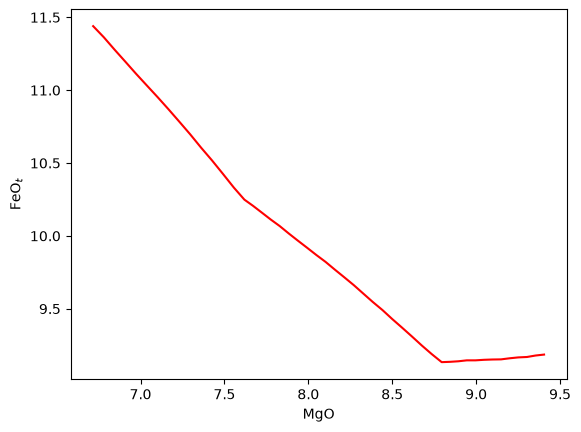
Assuming the crystallization model above ran without any issues we can now progress to testing the integration of MAGEMin with PetThermoTools. First make sure you have the up to date version of PetThermoTools installed (v0.2.51 or later). Restart the kernel and then run the 3 cells below.
Remember, after restarting the kernel you have to run the command ptt.activate_petthermotools_env() again
[1]:
import petthermotools as ptt
ptt.__version__
alphaMELTS for Python files successfully located.
If using the Green et al. (2025) or Weller et al. (2024) thermodynamic models please run `ptt.activate_petthermotools_env()` prior to any calculations.
nGibbs not installed — nGibbs emulators are unavailable. Install it if you'd like with `ptt.install_nGibbs()` (~300 MB storage required).
[1]:
'1.1.4'
[2]:
ptt.activate_petthermotools_env()
Julia environment detected.
Initializing MAGEMin environment and workers...
Detected IPython. Loading juliacall extension. See https://juliapy.github.io/PythonCall.jl/stable/compat/#IPython
  Activating project at `~/.petthermotools_julia_env`
  Activating project at `~/.petthermotools_julia_env`
      From worker 2:      Activating project at `~/.petthermotools_julia_env`
      From worker 4:      Activating project at `~/.petthermotools_julia_env`
      From worker 3:      Activating project at `~/.petthermotools_julia_env`
      From worker 5:      Activating project at `~/.petthermotools_julia_env`
Using libMAGEMin.dylib from MAGEMin_jll
      From worker 2:    Using libMAGEMin.dylib from MAGEMin_jll
      From worker 4:    Using libMAGEMin.dylib from MAGEMin_jll
      From worker 3:    Using libMAGEMin.dylib from MAGEMin_jll
      From worker 5:    Using libMAGEMin.dylib from MAGEMin_jll
Julia Environment and Workers Ready.
[3]:
comp = {"SiO2_Liq": 47.5,
        "Al2O3_Liq": 16.4,
        "CaO_Liq": 11.6,
        "MgO_Liq": 9.38,
        "FeOt_Liq": 9.16,
        "K2O_Liq": 0.329,
        "Na2O_Liq": 2.25,
        "TiO2_Liq": 2.29,
        "Fe3Fet_Liq": 0.15,
        "Cr2O3_Liq": 0.0,
        "H2O_Liq": 0.68}

Results = ptt.isobaric_crystallisation(bulk=comp,
                             Model = "Green2025",
                             dt_C = 2.0,
                             T_end_C=1100.0,
                             P_bar=1000.0,
                             find_liquidus=True,
                             Frac_solid=True,
                             timeout=300)
[4]:
import matplotlib.pyplot as plt
plt.plot(Results["All"]["MgO_Liq"], Results["All"]["FeOt_Liq"], '-r')
plt.xlabel('MgO')
plt.ylabel('FeO$_t$')
[4]:
Text(0, 0.5, 'FeO$_t$')